

Repurposing a webinar means turning one recording into a stack of standalone assets: clips, an anchor blog post, a podcast episode, an FAQ page, and more. The immediate move is simple. Pull the full transcript, then produce two high-value pieces first, an anchor blog post and two short clips, before the recording goes cold. Everything else in this guide builds off that first hour.
Table of Contents
- What Should You Repurpose a Webinar Into First?
- How Do You Repurpose a Webinar in Three Hours?
- Which Webinar Segments Match Each Funnel Stage?
- What Tools Speed Up Webinar Repurposing?
- How Do You Optimize Repurposed Content for AI Search?
- How Long Should a Webinar Repurposing Calendar Run?
- Why Human Review Still Matters for AI-Assisted Repurposing
- How Do You Handle Permissions and IP When Repurposing a Webinar?
- How Do You Adapt Repurposed Webinar Content for Different Audiences?
- How Do You Keep Brand Voice Consistent Across Repurposed Assets?
- What Mistakes Should You Avoid When Repurposing a Webinar?
- Publisher Perspective: A Quick Win We Use With Clients
- Scale This Without Adding Headcount
- Selected Reading and Tools
- Sources
- FAQ
What Should You Repurpose a Webinar Into First?
Not every asset deserves equal attention. Some formats take fifteen minutes and drive real traffic. Others take a full day and barely move the needle. Here's how to rank them.
Short clips (30 to 90 seconds). These are your highest-return asset. Pull the moment a speaker makes a bold claim or answers a hard question, caption it, and post it natively on LinkedIn, Instagram, and YouTube Shorts. Video platforms reward native uploads over links, and a sharp 45-second clip often outperforms the full 60-minute replay for reach.
The anchor blog post. Take the cleaned transcript, structure it around the session's core argument, and publish it as a standalone article that links out to every other asset. This becomes the SEO hub for the entire webinar, the page Google and AI search tools find when someone searches your topic months later.
An FAQ page built from live Q&A. Attendees already told you what they wanted to know. Turn those verbatim questions into an on-page FAQ with FAQPage schema, and you've built a long-tail magnet that AI answer engines can lift directly.
Everything else, in priority order:
- Podcast audio edit (strip the visuals, keep the talk track, publish to your existing feed)
- Gated PDF guide or ebook (repackage the deep-dive segment for a lead magnet)
- Social carousels summarizing three to five key takeaways
- Infographic pulling one dataset or framework the speaker referenced
- A LinkedIn document post or SlideShare deck built from the presentation slides
Repurposing this way, according to Wistia's analysis, is common practice. Many marketers reuse webinar content in some form, and a significant portion of webinar views happen months after the live event. The clips and the anchor post are what keep pulling that traffic long after the invite emails stop working.
How Do You Repurpose a Webinar in Three Hours?
The window that matters most is the sixty minutes right after the webinar ends, while the transcript is fresh and the speaker's context is still sharp in everyone's head. MarketingProfs outlines a three-hour sprint that turns one session into a full 30-day content calendar. Here's the timed version:
- Before the event: Assign one person as the content-capture owner. Their only job is watching for clip-worthy moments and marking timestamps. Brief speakers to pause for two seconds after a strong point. That pause gives you a clean edit point later.
- During the live session: Log timestamps in real time whenever a speaker makes a notable claim, whenever chat lights up, and whenever a poll result surprises you. Mark every Q&A question with its own timestamp.
- First 60 minutes after the event: Generate the full transcript, build a rough clip library from your timestamp log, and draft a one-page outline for the anchor blog post: thesis, six to eight takeaways, and the strongest verbatim quotes.
Pro Tip: Don't skip the outline step and jump straight to writing five separate assets. Build one reviewed outline from the transcript first, then generate the blog post, social copy, and podcast description from that single document. It's the fastest way to stop factual errors from spreading across every piece you publish.
Teams that run this process see real time savings. Livestorm's benchmark data found that structured repurposing generates roughly 13 times more content assets than building each piece from scratch, while cutting total production time by about 75%.

Which Webinar Segments Match Each Funnel Stage?
Not every minute of your webinar belongs in the same place. Mapping segments to funnel stage tells you what format to build and what call to action to attach.
- Top of funnel (awareness): The opening framing and any big-picture industry commentary. Turn these into short clips and social posts with a soft CTA, something like "follow for more" or a newsletter signup.
- Middle of funnel (consideration): Deep-dive segments where the speaker walks through a framework, a case study, or data. These become the anchor blog post and a gated PDF, paired with a CTA to download a related resource or join a mailing list.
- Bottom of funnel (conversion): The Q&A section, especially pricing questions, objection handling, and "how do I get started" moments. These become your FAQ page and a short highlight clip, paired directly with a demo request or consultation CTA.
Use engagement signals from the live event to decide where to spend editing time. A poll question that got 80% participation, a chat thread that blew up, or a Q&A moment that ran long, those are the segments your audience already told you they cared about. Build there first.
What Tools Speed Up Webinar Repurposing?
AI tools have made the mechanical parts of repurposing fast. They haven't made the judgment calls disappear.
- Transcription and timestamps: Tools like Otter.ai, Rev, and Descript generate transcripts in minutes, but auto-transcription still misreads names, numbers, and jargon. A quick human pass catches those before they end up in a published blog post.
- AI clip extraction: Highlight-detection tools scan for tone shifts and engagement spikes to suggest clip-worthy moments. They frequently flag filler pauses or off-topic tangents as "highlights," so review the shortlist before publishing.
- AI drafting for blog posts: AI can turn a transcript outline into a full draft fast, but it needs a 15 to 30 minute human cleanup pass to strip out conversational artifacts like "as I mentioned earlier" and to fix any hallucinated statistic or misattributed quote.
- Captioning and scheduling: Auto-captioning tools and scheduler integrations handle the repetitive publishing work across platforms.
A roundup of AI video tools built specifically for webinar repurposing is worth bookmarking if you're comparing transcription and clipping software.
Pro Tip: Never publish an AI-drafted asset without checking it against the reviewed transcript outline. It's the single fastest way to catch a fabricated statistic before it reaches your audience.
How Do You Optimize Repurposed Content for AI Search?
Publishing a webinar transcript alone rarely earns the visibility teams expect. Structure matters as much as content when AI search platforms decide what to cite.
- Publish one canonical anchor page that houses the full recording, transcript, and links to every clip. This becomes the definitive home Google and AI tools point to.
- Convert live Q&A into an on-page FAQ section and mark it up with FAQPage schema, so answer engines can lift individual questions directly.
- Publish the cleaned transcript with semantic headings and visible timestamps rather than a wall of unbroken text.
- Write clip titles and YouTube descriptions with the specific question or claim the clip answers, not a generic episode number.
Structuring assets this way creates more entry points for discovery, according to a 2026 guide on maximizing webinar reach and SEO, and gives AI-driven search tools cleaner text to cite when someone asks a related question later.
How Long Should a Webinar Repurposing Calendar Run?
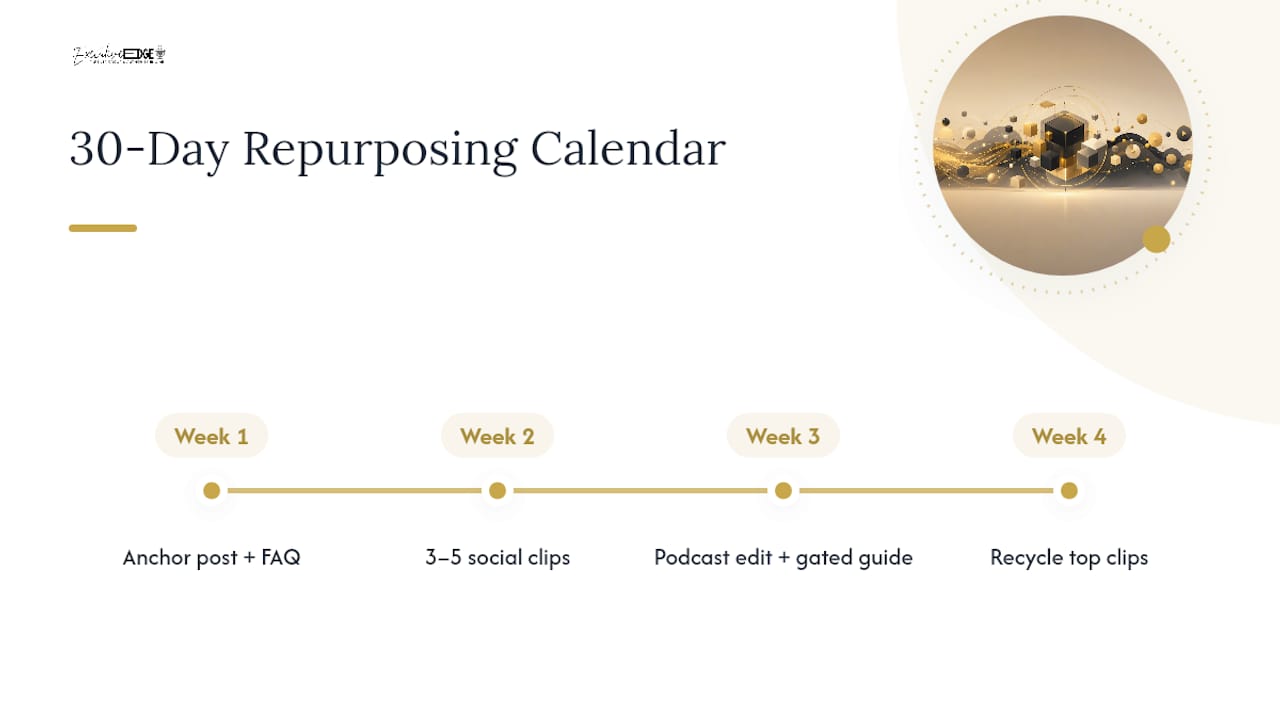
One webinar can realistically fuel a dozen or more published assets for a small team, or more when a dedicated editor is involved. Spread across 30 days, a typical cadence looks like this: week one publishes the anchor post and FAQ page, week two rolls out three to five clips across social channels, week three drops the podcast edit and gated guide, and week four recycles top-performing clips with fresh captions.
Track organic sessions to the anchor page, video click-through and watch time, social engagement per clip, email click rates on the recap send, and demo requests tied to the campaign. Tag every asset with its own UTM parameter so you know which clip or post actually drove the conversion, and revisit the calendar if one asset format consistently underperforms.
Why Human Review Still Matters for AI-Assisted Repurposing
AI-drafted assets tend to carry the same recurring flaws: hallucinated statistics, references to things "shown earlier" that don't exist in a standalone post, and a flattened tone that doesn't sound like your speaker. A short human pass fixes all three, tightens the one-sentence takeaway at the top, sharpens the CTA, and confirms the piece still sounds like your brand. Executive Edge Partner Group builds that review step into every asset before it publishes, not as an afterthought.
How Do You Handle Permissions and IP When Repurposing a Webinar?
Every person on camera, speaking on the recording, or featured in a slide deck has some claim over how that content gets reused. Skipping this step is how a great clip turns into a legal headache.
Start with your registration and consent language. If your platform's terms don't already cover recording and reuse across formats, add a line to your registration flow stating the session may be recorded and portions may be repurposed for marketing. Get explicit written sign-off from co-presenters, guest speakers, and any outside panelists before you publish clips featuring them, especially if they work for a different company than the one hosting the webinar.
Slide content deserves its own check. Stock photos, licensed data charts, and third-party logos embedded in a speaker's deck often carry usage restrictions that don't automatically extend to a blog post or a social clip. Strip anything you can't independently verify the rights to, or replace it with your own version.
Audience questions submitted during Q&A generally belong to the person who asked them. When you're building the FAQ page, keep the question but strip any identifying detail, name, company, personal situation, unless that person agreed to be quoted publicly. A generic phrasing of the same question does the job without the exposure.
How Do You Adapt Repurposed Webinar Content for Different Audiences?
The same fifty-minute recording rarely works unedited across every channel and every reader. A finance director skimming LinkedIn during a meeting break wants a different entry point than a hands-on practitioner searching for a how-to guide at 11 p.m.
Segment by intent first, not just by platform. Executives and decision-makers respond better to a tight 90-second clip that states the business impact up front, revenue, cost, risk, in the first ten seconds. Practitioners and technical readers want the long-form blog post with the full methodology, because they're evaluating whether to implement what the speaker described.
Platform norms matter too. LinkedIn audiences expect a point of view in the caption, not just a video link. YouTube audiences will sit through eight minutes if the thumbnail and title promise a specific answer. Podcast listeners, by contrast, are often multitasking, so the audio edit needs verbal signposting, "here's the second point," that a video viewer doesn't need because they can see chapter markers.
Language and framing shift by segment, too. A webinar aimed at enterprise buyers might use one case study for a LinkedIn carousel and swap in a different, smaller-scale example for a small-business email newsletter pulling from the same session.
How Do You Keep Brand Voice Consistent Across Repurposed Assets?
The fastest way to undercut a strong webinar is publishing a dozen assets that all sound like they were written by different people, because in a sense, they were: your speaker, an AI drafting tool, and whoever wrote the social caption at 4:45 p.m.
Build a one-page brand voice reference before the repurposing sprint starts, three to five sentences describing tone (direct, warm, technical, conversational), a short list of words your brand avoids, and two or three example sentences pulled from past top-performing content. Hand that page to anyone editing AI-drafted copy.
Keep the speaker's actual phrasing in quotes and clips wherever it's strong. Audiences can tell the difference between a real quote and a paraphrased summary that's been smoothed into generic marketing language, and the real version usually performs better anyway.
Run a final consistency pass across the full asset batch before publishing, not just each piece individually. It's easy to catch one off-brand paragraph in isolation and miss that three different assets used three different terms for the same product feature.
What Mistakes Should You Avoid When Repurposing a Webinar?
The biggest mistake is treating repurposing as an afterthought instead of building it into the event itself. Teams that wait until after the webinar to think about content end up scrubbing through sixty minutes of raw footage with no timestamps and no notes, which is exactly the operational drag that Livestorm's research points to. A notable share of marketers cite time constraints and inadequate tooling as the main reasons they don't repurpose content consistently, rather than a lack of ideas.
A second common failure is publishing raw AI output without a human pass, which lets factual errors, awkward phrasing, or a hallucinated statistic slip into a published post. A third is ignoring funnel mapping entirely and slapping the same generic CTA on every asset, whether it's a top-of-funnel awareness clip or a bottom-of-funnel FAQ page meant to drive a demo request.
The last one is subtler: publishing everything at once instead of spreading assets across a real distribution calendar, which buries strong content under a single day's feed instead of letting it compound over weeks.
Publisher Perspective: A Quick Win We Use With Clients
Three steps, every time: assign a capture owner before the session starts, draft the outline within 60 minutes of it ending, and publish the anchor blog post within 48 hours. For business owners in Tyler and East Texas, we often see this simple sequence outperform teams with far bigger budgets, because speed protects relevance.
— David Domm
Scale This Without Adding Headcount
Running the three-hour sprint once is manageable. Running it every month, for every webinar, while also handling clip libraries, FAQ pages, and distribution calendars, is where most internal teams stall out. Executive Edge Partner Group is the alternative to hiring a full content team: a done-for-you system that turns your webinars, podcasts, and expert commentary into publish-ready blog posts, clips, and social content, built with GEO and AEO optimization so AI search platforms can actually find and cite what you produce.

The service handles the parts that eat internal hours: transcript cleanup, clip libraries, anchor blog drafting, and FAQ schema markup, all passed through human editorial review before anything publishes. For a consultant, attorney, contractor, or executive who wants the authority-building output of an in-house content team without hiring one, that's the practical trade-off. Teams using this kind of managed system typically see:
- A steady monthly output of blog posts, clips, and social assets from a single webinar or podcast recording
- Search and AI-discovery optimization built into every published asset, not bolted on afterward
- No internal editing hours spent cleaning up AI drafts before they go live
Visit Executive Edge Partner Group to see how the system fits into your existing webinar and podcast schedule.
Selected Reading and Tools
- Turn One Webinar Into 30 Days of Content — the three-hour sprint framework
- Turn One Webinar Into 15+ Content Assets — outline-first asset generation
- Best AI Tools For Webinar Repurposing — transcription and clipping tool comparisons
Sources
- How Webinars Accelerate Content Velocity | Livestorm
- Turn One Webinar Into 30 Days of Content | MarketingProfs
- 10 Clever Ways to Repurpose Your Webinar Content | Wistia
- Turn One Webinar Into 15+ Content Assets | Get Wicked Growth
FAQ
Are Webinars Still Effective in 2026?
Yes. Repurposed webinar assets keep earning views long after the live date, with Wistia's data showing roughly a third of total views happen three months or more after the event, and AI search platforms now surface transcript-based FAQ pages and anchor posts built from webinars.
What Are Common Webinar Mistakes to Avoid?
The biggest ones are skipping timestamp capture during the live event, publishing AI drafts without human review, and using a single generic CTA across every asset regardless of funnel stage.
Are Webinars Still Relevant for Lead Generation?
Yes, especially when the Q&A segment gets repurposed into an FAQ page tied to a demo or consultation CTA, since those bottom-of-funnel questions signal genuine buying intent.
How Many Assets Can One Webinar Actually Produce?
A small team can typically produce 12 to 18 published assets from a single session, rising to around 25 with a dedicated editor, spread across clips, blog posts, an FAQ page, social content, and a podcast edit.
Do I Need FAQPage Schema for Repurposed Q&A Content?
Adding FAQPage structured data to a webinar's Q&A section helps answer engines and AI search tools surface individual questions directly, making it one of the more reliable long-tail discovery tactics available for repurposed content.